Ages 2 to 8 · Android · Teacher Approved on Google Play
A calm sticker puzzle game for little kids, with no ads and no internet needed
A picture appears with pieces missing. Your child drags each sticker to the spot where it belongs until the scene is complete. There are no ads, nothing to buy, no account, and every level plays with the device in airplane mode.
- No ads at all: no banners, no videos between levels
- Plays offline, on a plane, in the car or in a waiting room
- Collects no data. One payment of $0.99, no subscription
- Teacher Approved
- Rated Everyone
- No data collected
- No in-app purchases

How Sticker Builder plays
There is one idea in the game and a young child picks it up in seconds: find where the sticker goes, then put it there. No reading, no timer, no score.
1. Choose a picture
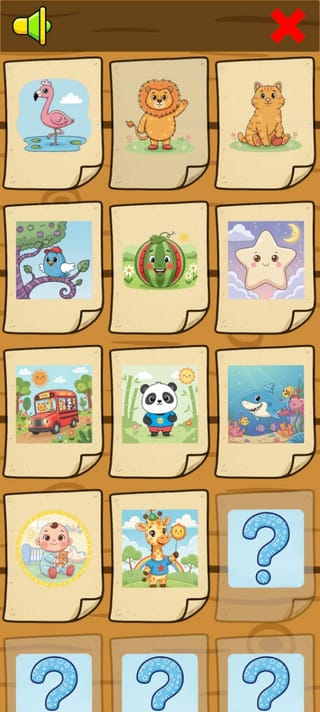
The picture board shows the scenes: a flamingo, a lion, a panda, a shark, a safari bus and more. New pictures open up as your child plays.
2. Drag each sticker into place
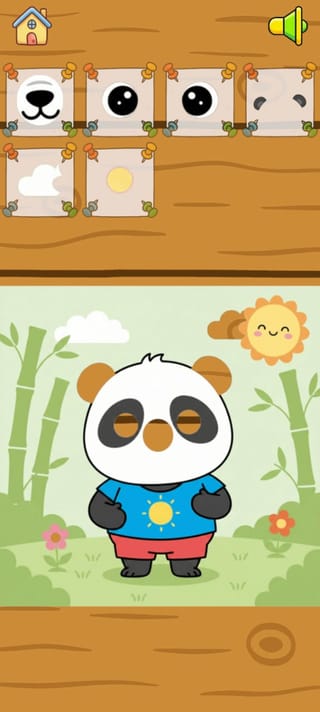
Stickers sit pinned on the board at the top. The scene below shows a shadow where each one is missing. Your child drags a sticker down and drops it on its shadow, where it snaps into place.
3. Finish the scene
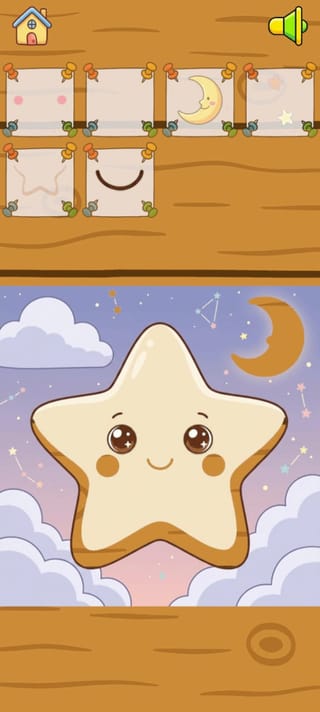
When the last sticker lands, the picture is complete and it is on to the next one. If a sticker is dropped in the wrong place it simply does not stick, so there is nothing to lose.


What is not in Sticker Builder
Most of what makes children’s apps hard to trust is what gets added on top of the game. Sticker Builder leaves all of it out.
No ads
No banners, no video ads between levels, no “watch an ad to unlock”. The game has no advertising in it at all.
Nothing to buy inside
No in-app purchases, no coins, no subscription, no upgrade screen. Your child cannot spend money in it.
No data collected
No sign-up, no analytics, no tracking. Google Play’s Data safety section lists no data collected and none shared.
No internet needed
Every picture and sticker is inside the download. Turn on airplane mode and the game plays exactly the same.
No chat or links out
Nobody can message your child, and there are no buttons that open a browser, a store page or another app.
No AI
No chatbot, no voice input, nothing generated on the fly. The scenes are fixed, so the game is the same every time.
Check it yourself before you pay
You do not have to take our word for any of this. Each claim on this page can be checked in a couple of minutes.
Look under the title on Google Play
Google Play shows a “Contains ads” label on apps with advertising and an “In-app purchases” label on apps that sell things inside. Sticker Builder’s listing has neither.
Open the Data safety section
On the same listing, Data safety reports “No data collected” and “No data shared with third parties”, and notes the developer’s commitment to the Play Families Policy.
Run the airplane mode test
Install it, open it once, then switch on airplane mode and play. A game that needs the internet stalls or shows empty boxes. This one keeps going.
The listing also carries Google Play’s Teacher Approved badge, which is given to children’s apps that teachers and specialists have reviewed for age-appropriateness, design and enjoyment.
Who it is for
Sticker Builder is made for children from about 2 to 8 years old, and it suits some ages and moments better than others.
- Ages 2 and 3
- The best fit. One simple action, big targets for small fingers, and pictures they recognise. Many two year olds need you beside them for the first few scenes.
- Ages 4 to 6
- Children play on their own and finish scenes quickly. It is a good calm-down game and a good one for the car.
- Ages 7 and 8
- Older children may find it easy. It works best for them as a relaxing game rather than a challenge.
- Good moments for it
- Flights and car journeys, doctor’s waiting rooms, restaurants, and quiet time when you want a short, finishable activity.
It is not a good fit if your child wants competition, levels that get much harder, or reading and maths practice. And it is Android only: there is no iPhone or iPad version.
Why it costs $0.99 instead of being free
A free children’s game still has to earn money, and there are three usual ways: showing ads, selling a subscription, or selling things inside the game. A small one-time price removes the need for all three.
| Free with ads | Subscription app | Sticker Builder | |
|---|---|---|---|
| What you pay | Nothing up front | Often $5 to $10 a month | $0.99 once |
| Ads your child sees | Banners and videos | None while you pay | None |
| Works with no internet | Rarely | Sometimes, after downloads | Yes, always |
| Can your child buy things | Usually | Upgrade prompts | No |
| Data collected | Often an advertising ID | An account at least | None |
If it is not right for your child, Google Play lets you request a refund on a recent purchase under its refund policy.
Questions parents ask
Does Sticker Builder have ads?
No. There are no banner ads, no video ads and no rewarded ads to unlock anything. Google Play requires a “Contains ads” label on apps that show advertising, and the Sticker Builder listing does not have one.
Does it work without WiFi or mobile data?
Yes. All the pictures and stickers are inside the download, so once it is installed the game plays with no internet connection at all, including in airplane mode on a flight.
How much does it cost? Is there a subscription?
It is a single purchase of $0.99 in the US (prices in other countries follow Google Play’s local pricing). There is no subscription, no in-app purchase and no paid upgrade, so nothing else can be charged later.
What age is Sticker Builder for?
Children aged about 2 to 8. It suits 2 to 4 year olds best, because the game uses one simple drag action and large drop targets. Older children tend to treat it as a relaxing game rather than a challenge.
Is Sticker Builder on iPhone or iPad?
No. It is available for Android phones and tablets through Google Play only.
What data does it collect about my child?
None. There are no accounts, no analytics and no advertising tools in the app, and its Google Play Data safety section reports no data collected and no data shared with third parties.
What does my child learn from it?
Matching a sticker to its shadow practises visual discrimination (noticing shapes and details), hand-eye coordination and the fine finger control of dragging and dropping, along with the patience to finish a task. It is a calm play activity, not a reading or maths curriculum.
Does Sticker Builder use AI or have a chatbot?
No. There is no chatbot, no voice input and no AI-generated content. The scenes are fixed and ship inside the app, so it behaves the same way every time and never needs a server.
Made by one independent developer
Sticker Builder is designed, built and maintained by Georges Sader and published on Google Play under the name Happylivia. There is no investor, no ad network and no data business behind it, which is why it can stay this simple. You can email the developer directly with questions, bugs or ideas.
Guides for parents
Practical, unsponsored guides on choosing calm, ad-free and private games for young children.
- How to check a kids app before you download it: ads, purchases, data and permissions
A two-minute check for any kids app on Google Play: the ads and purchases labels, Data safety, permissions, reviews, and red flags for under-8s.
- Free vs paid kids games: what “free” really costs, and when paying makes sense
How free, subscription and one-time-purchase kids apps make money, what each means for ads, data and offline play, and how to choose without overpaying.
- No-WiFi games for kids: offline apps and screen-free ideas for flights, cars and waiting rooms
Make sure games work with no internet before you leave, the best offline apps for ages 2 to 8, and screen-free ideas for planes, cars and waiting rooms.
- Puzzles by age: what to choose for children aged 2 to 8
How many puzzle pieces suit each age, which puzzle types fit ages 2 to 8, how to tell when a child is ready for harder ones, and what to look for in apps.
- What puzzles teach toddlers and preschoolers (and what they don’t)
The skills puzzles, matching and sticker games practise in children aged 2 to 5, what they don’t teach, and how to play along so it counts.
- How much screen time for kids? What the current guidance says, age by age
Screen time by age from the AAP’s 2026 policy statement and the WHO, for babies to 8 year olds, plus the 5 Cs and what matters more than minutes.
One small payment, then nothing else
No ads, no purchases inside, no data collected and no internet needed. Install it once on your Android phone or tablet and it is ready wherever you are.
Get Sticker Builder on Google Play$0.99 once · Android phones and tablets